[table id=7 /]
How to change Jio wifi name
- Open the router in any web browser
- Go to the Network – Wireless option
- Find the 2.4ghz & 5Ghz Channel
- Go to SSID of Each channel separetely
- Change the name to Any name you want
- Click on Save & Reboot the Router
- You will see the new SSID (Wifi Name) on your Device (Laptop/Mobile)
Important things you find nowhere :
- you can change the wifi password through the web login from 192.168.29.1
- You can change the SSID Name
- You can Forward the port using DMZ Rule, for RDP, CCTV, DVR, IP Camera, etc ..
- You can change the wifi password with the web & my jio app both.
- You can simply see who is connected to your wifi, and you can block them from using my jio app.
- You can Connect any wifi repeater to the jio gigafiber router
- You can change the Local LAN IP address from 192.168.29.1 to 192.168.1.1 or 172.16.0.0.1 etc.
- You can connect you STB – Set up box to jio gigafiber router without wire,it will work wirelessly
Read the article Completely: Very useful
How to reset jio fiber router
- Login to the Router from any web browser with IP Address: 192.168.29.1
- There will be a reset option in the ings
- Click on the Reset Button and hit enter
- You are Done
You can change your Wifi Password from MyJio by following the below steps
- Login to MyJio App, select Jiofiber Account
- Click on Menu on the top left corner and select settings
- Select Device Settings > My Device wait for a few seconds until the Jiofiber Router details appear
- Click advanced settings on the top right corner of the screen->Personal section for both Jiofiber Router 2.4 and 5 GHz
- Click on each SSID(Wifi Name) for changing user ID. Then to change the password, enter a new password & save
- Click for video on how to manage your JioFiber Router
To change through Jio.com follow below steps
- Login to www.jio.com
- Click on sign-in on the menu bar, Click JioFiber
- Enter your Service ID/ Registered Mobile Number, Click on generate OTP
- Enter OTP received on Registered Mobile Number.
- Click ->Settings icon ->My Device -> ONT- Advanced Settings
- Click on each SSID (Wifi Name) for changing user ID. Then to change the password, enter a new password & save
Default IP of Jio gigafiber Router
IP Address – 192.168.29.1
Username – admin
Password – Jiocentrum
Why Should You Change the Giga Router Password?
The default password for a router is well-known to hackers and is also available on the internet. So using the default password is very risky, any attacker or individual who comes within the signal range of an unsecured router can access the admin page of your router. And you know once hacker access they can change the password, locking the router, hijacking the network, etc. So you should change the default password of Jio Fiber Router. A weak password like “987654321” does not work. So you must choose a strong password that should be difficult for others to guess easily . This will make your router /wifi safe
How to Change Password & SSID of Jio Giga Fiber Router?
- Turn on the PC/ Laptop & make sure you connected to your gigafiber Router.
- Type 192.168.29.1 in the browser to log in to web configuration utility.
- Enter ‘admin‘ as username and ‘Jiocentrum‘ as a password.
- Create a new password (Example: jiofiber123@@) and click on the Save button.
- Once credentials are updated successfully, you need to re-login with the new password.
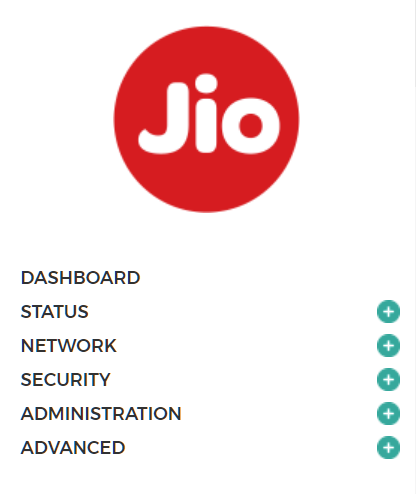
- Now you will be taken to the router admin homepage where you will see 6 options: Dashboard, Status, Network, Security, Administration & Advanced.